
Companion program for Brother-branded printers
Brother Print&Scan is a free utility program for PCs developed by Brother Industries Ltd. It is the official companion app for the company's range of printers across various models. It allows users to take full advantage of the device-specific features and options for their home and office productivity needs.
Top Recommended Alternative
Similar to the Brother Mobile Companion app for Android and iOS, the Brother Print&Scan ensures seamless operation across devices and platforms while providing a consistent and unified user experience. It supports scanners, monochrome and color printers, and mobile printers across various models and product ranges for maximum compatibility.
Streamlined Printing and Scanning
Brother iPrint&Scan Light allows easy access to Brother machines. Users can print, scan, and manage other workflows coming from the printing machine. They must remember, however, that supported functions depend on the capabilities and specifications of the printer.
The app works with various Brother devices, including Brother Color Laser LED FAX/MFC series, Color Laser LED Printer series, Inkjet FAX/MFC series, Mono Laser FAX/MFC series, Mono Laser Printer series, and Scanner series. The software can detect any Brother printer connected to the computer or local network. It searches for connected Brother devices via USB or network connection. Users must make sure that their Brother machine is compatible with the utility software.
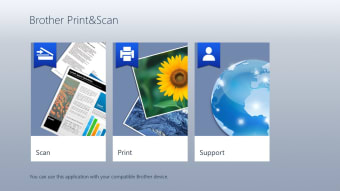
The user interface is accessible and streamlined. Home users, students, and office workers can get their job done quickly. It comes with two functions: printing and document scanning.
For its printing function, users can select the document or image, pick a paper size, and adjust further settings before printing. Depending on the machine model, users can also print from a mobile device. They must connect their mobile device and Brother machine into a local network before they can use the printing function.
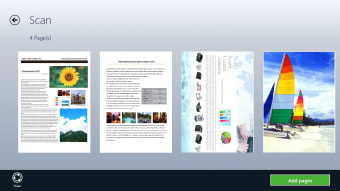
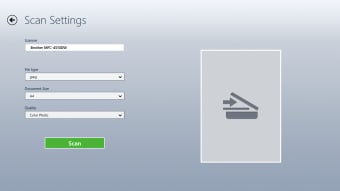
For the document scanning function, users can change the settings such as paper size, color setting, document resolution, and 2-sided scanning. A preview of the scan results is displayed. Users can save the document to the computer, have a copy saved on other applications, or attach it to an email. They can add extra pages to scan more pages.
An essential must-have
All in all, if you own a printer or scanner made by Brother, then the Brother Print&Scan utility software is a must-have to make the most out of your devices and be able to maximize all the functions and features it provides. Just make sure your specific model is supported, and you're good to go. Download and install it now.













.png)